Kayla Sinden working at her desk, IT Girl at RSAWEB.

By Kayla Sinden

Nov 12th, 2026

3 min read

How to top up your RSAWEB Prepaid Fibre in a few easy steps

Need to top up your Prepaid Fibre? We’ve made it easy! 

With RSAWEB and Octotel Prepaid Fibre, you’re in control of your connection. No contracts, no debit orders and no fuss. Just pay as you go and stay connected to what matters most. 

When you’re recharging your Fibre, here’s how to do it in a few simple steps. 

Two friends smiling while using a smartphone, with the text "How to top up your RSAWEB Prepaid Fibre".

Step 1: Visit the RSAWEB Prepaid Fibre website

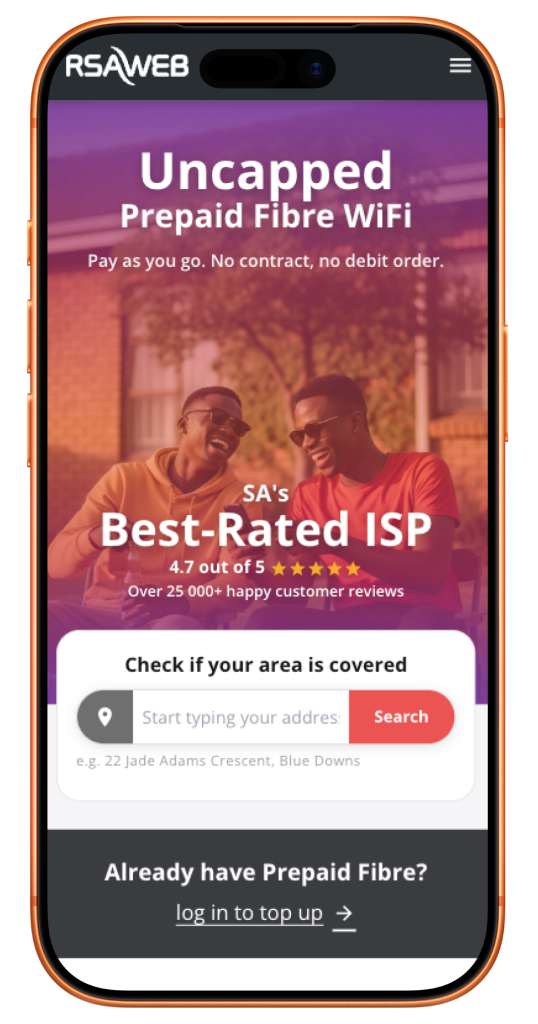
RSAWEB Prepaid Fibre homepage showing the log in to top up option

Head over to prepaid.rsaweb.co.za. 

On the homepage, look for “Already have Prepaid Fibre?” and click “log in to top up”. 

Step 2: Sign in with your cell number

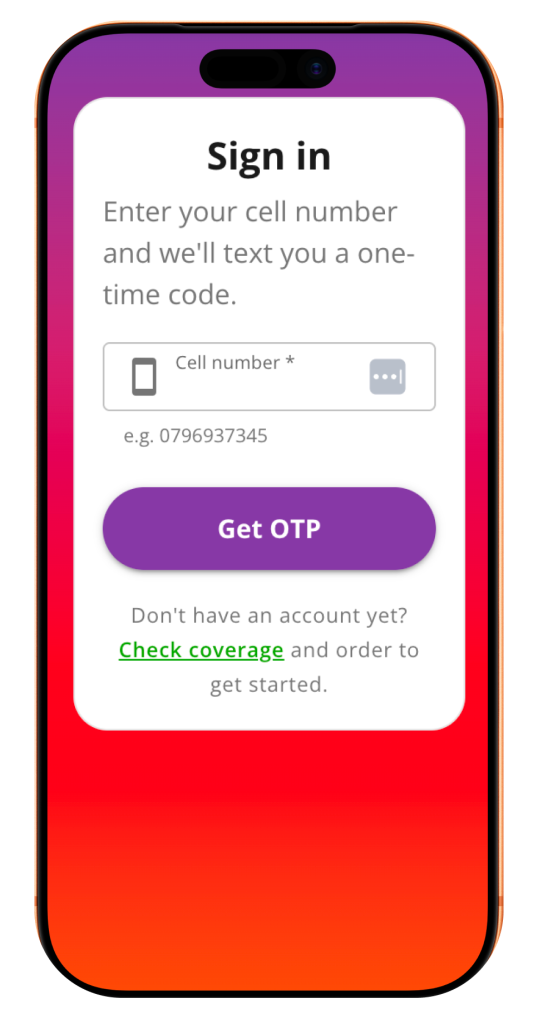
RSAWEB Prepaid Fibre sign-in page requesting a cell number

Enter the cell number linked to your RSAWEB Prepaid Fibre account and click “Get OTP”. 

We’ll send you a one-time PIN (OTP) via SMS to verify it’s you.

Step 3: Enter your OTP

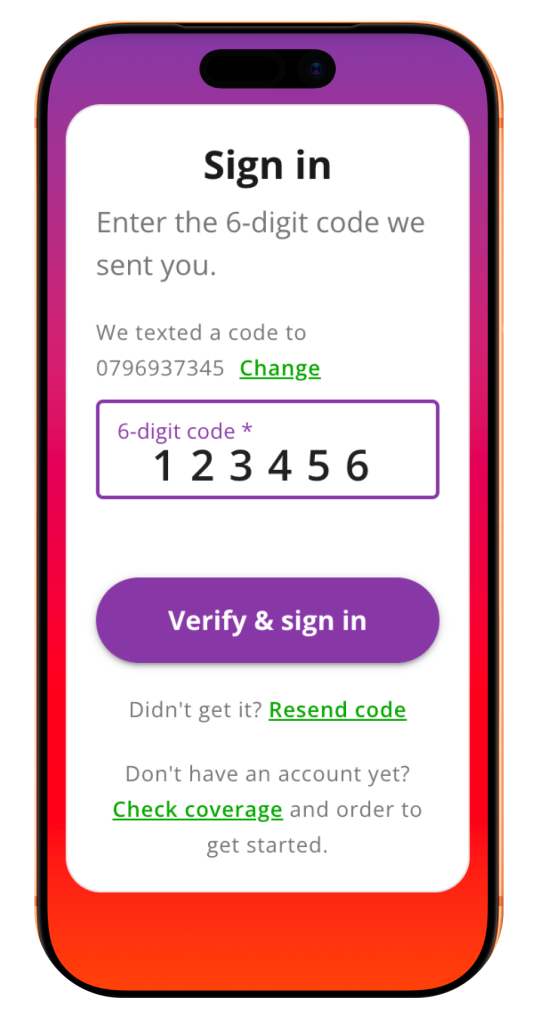
Entering a 6-digit SMS OTP to sign in to RSAWEB Prepaid Fibre

Once you’ve received your SMS, enter the 6-digit code and click “Verify & sign in”. 

You’re in! You can now view your Prepaid Fibre service and manage your top-ups. 

Step 4: Click "Recharge"

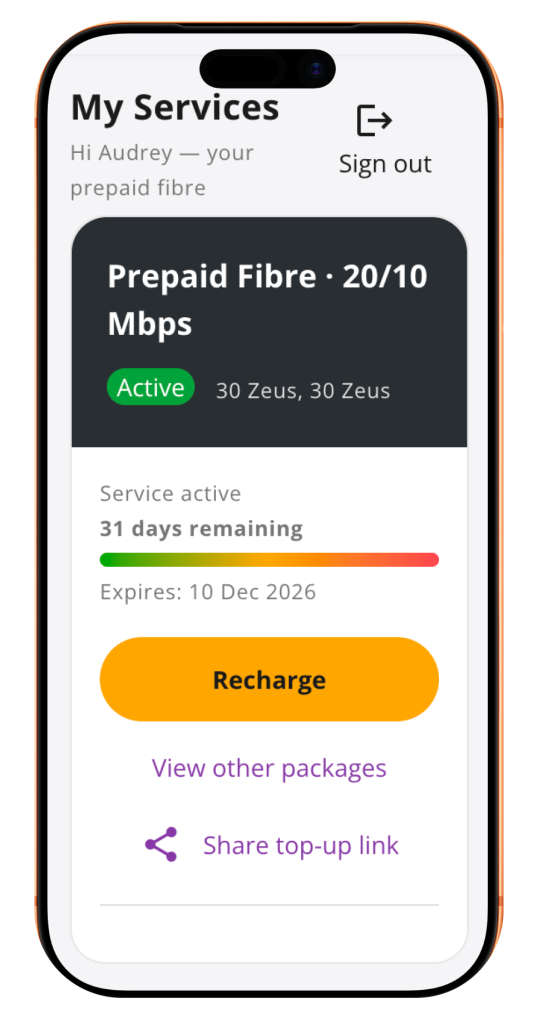
RSAWEB Prepaid Fibre My Services dashboard with Recharge button.

On your “My Services” page, you’ll see your Prepaid Fibre package, connection status and how many days you have remaining. 

Ready to top up? Simply click the yellow “Recharge” button under your Fibre package. 

Step 5: Confirm your recharge

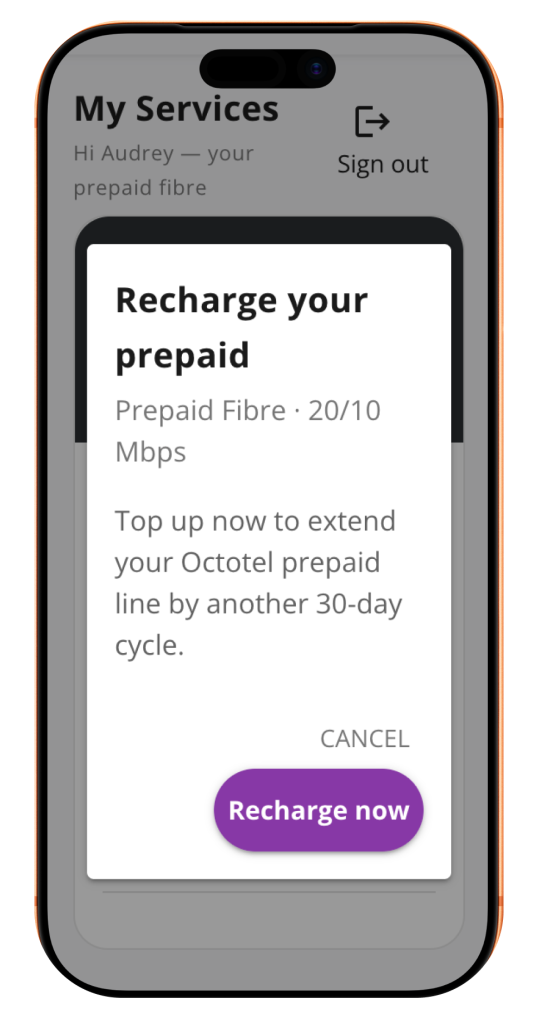
Recharge confirmation pop-up for RSAWEB Prepaid Fibre

A pop-up will appear asking you to confirm your recharge. 

Click “Recharge now” to continue with your top-up and extend your Prepaid Fibre service by another 30-day cycle.

Step 5: Confirm your recharge

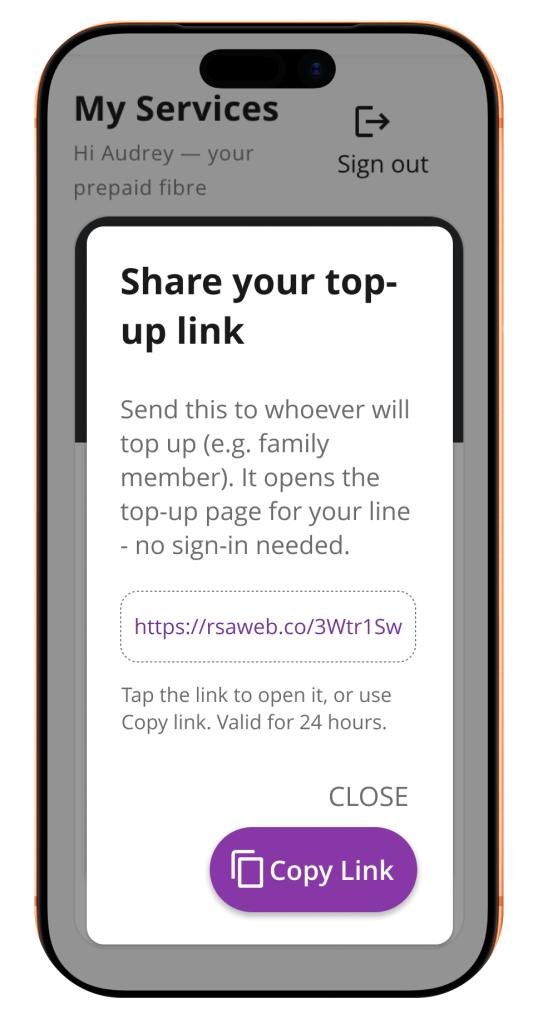
RSAWEB Prepaid Fibre share top-up link option

Want someone else to help you top up? We’ve made that easy, too! 

On your “My Services” page, click “Share top-up link”. 

A pop-up will appear with a unique link for your Fibre service. From here, you can: 

  • Open the link yourself to access your top-up page. 
  • Click “Copy link” and send it to a friend or family member who can top up on your behalf. 

Just remember, your shared top-up link is valid for 24 hours. 

That's it! You're ready to stay connected.

Topping up your RSAWEB Prepaid Fibre is that simple. 

Whether you’re recharging yourself or sharing a top-up link with someone who can help, managing your Fibre is quick and convenient. 

And with no contracts, no cancellation fees and uncapped Fibre, you’ve got the freedom to stay connected your way. 

Ready to recharge? 

Visit prepaid.rsaweb.co.za and top up your Prepaid Fibre today! 

Latest Blogs

How to top up your RSAWEB Prepaid Fibre

Why Am I Lagging? Understanding Internet Connectivity for Gaming

How TikTok Is Taking South African Culture to the World

How to top up your RSAWEB Prepaid Fibre in a few easy steps

Kayla Sinden working at her desk, IT Girl at RSAWEB.

Kayla Sinden

Nov 12th, 2026

3 min read

Need to top up your Prepaid Fibre? We’ve made it easy! 

With RSAWEB and Octotel Prepaid Fibre, you’re in control of your connection. No contracts, no debit orders and no fuss. Just pay as you go and stay connected to what matters most. 

When you’re recharging your Fibre, here’s how to do it in a few simple steps. 

Two friends smiling while using a smartphone, with the text "How to top up your RSAWEB Prepaid Fibre".

Step 1: Visit the RSAWEB Prepaid Fibre website

Head over to prepaid.rsaweb.co.za. 

On the homepage, look for “Already have Prepaid Fibre?” and click “log in to top up”. 

RSAWEB Prepaid Fibre homepage showing the log in to top up option

Step 2: Sign in with your cell number

Enter the cell number linked to your RSAWEB Prepaid Fibre account and click “Get OTP”. 

We’ll send you a one-time PIN (OTP) via SMS to verify it’s you. 

RSAWEB Prepaid Fibre sign-in page requesting a cell number

Step 3: Enter your OTP

Once you’ve received your SMS, enter the 6-digit code and click “Verify & sign in”. 

You’re in! You can now view your Prepaid Fibre service and manage your top-ups. 

Entering a 6-digit SMS OTP to sign in to RSAWEB Prepaid Fibre

Step 4: Click "Recharge"

On your “My Services” page, you’ll see your Prepaid Fibre package, connection status and how many days you have remaining. 

Ready to top up? Simply click the yellow “Recharge” button under your Fibre package. 

RSAWEB Prepaid Fibre My Services dashboard with Recharge button.

Step 5: Confirm your recharge

A pop-up will appear asking you to confirm your recharge. 

Click “Recharge now” to continue with your top-up and extend your Prepaid Fibre service by another 30-day cycle. 

Recharge confirmation pop-up for RSAWEB Prepaid Fibre

Step 6: Share your top-up link

Want someone else to help you top up? We’ve made that easy, too! 

On your “My Services” page, click “Share top-up link”. 

A pop-up will appear with a unique link for your Fibre service. From here, you can: 

  • Open the link yourself to access your top-up page. 
  • Click “Copy link” and send it to a friend or family member who can top up on your behalf. 

Just remember, your shared top-up link is valid for 24 hours. 

RSAWEB Prepaid Fibre share top-up link option

That's it! You're ready to stay connected.

Topping up your RSAWEB Prepaid Fibre is that simple. 

Whether you’re recharging yourself or sharing a top-up link with someone who can help, managing your Fibre is quick and convenient. 

And with no contracts, no cancellation fees and uncapped Fibre, you’ve got the freedom to stay connected your way. 

Ready to recharge? 

Visit prepaid.rsaweb.co.za and top up your Prepaid Fibre today!Â